
We've worked really hard to make NDIS appointment bookings simple for NDIS participants and their carers. And we hope that you will really enjoy the simplicity with which you will be able to book a new provider or one you have seen before for your appointments.
But before you are able to use your NDIS funding for booking CARED providers, we will need set you up with a service agreement and an agreed budget that you have allocated for CARED providers.
This article will explain the process to get you set up and how the bookings afterwards look like.
1. Entering your NDIS details into the App
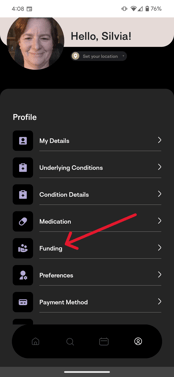
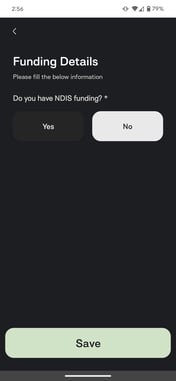
Go to your profile and select the Funding section - then activate the NDIS funding:
 |
 |
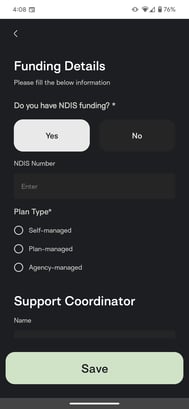
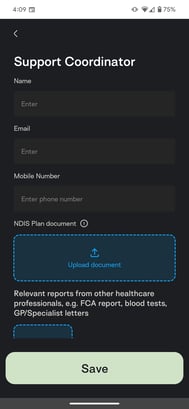
Then fill in your details, including NDIS number, plan type, support coordinator contacts and upload any plans that you have at hand. Don't worry if you have them elsewhere - you can also email them to us:
 |
|
After saving your information, you'll be in a submitted stage and CARED will reach out to you to discuss and prepare a service agreement for you to sign:
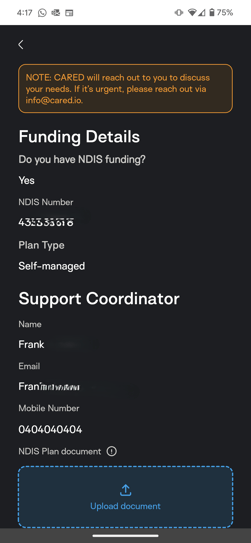 To send us any documents, particularly your NDIS plan, you can reach us on info@cared.io.
2. Setting up your Service Agreement
After having had a conversation with our lovely operations staff, you will have agreed on a budget from your NDIS plan that you want to spend on CARED providers.
We will send you a Service Agreement that is an online form that you will want to read carefully and sign. You will then receive a copy of that Service Agreement in email.
3. Activation of your CARED NDIS Budget
After we've received the signed Service Agreement, we will do a final manual check to see that everything is ok and will activate your NDIS budget.
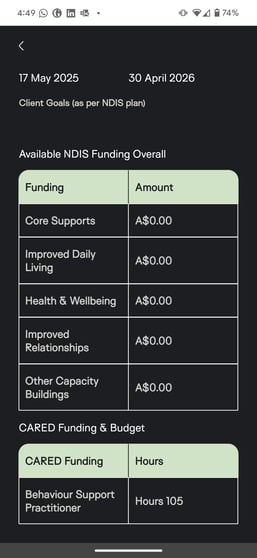
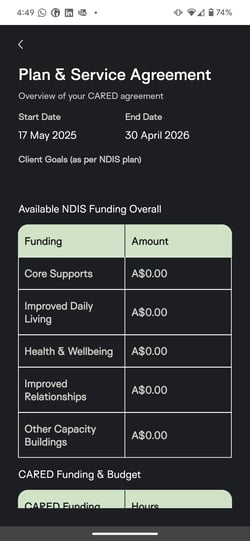
This means that under the "Funding" tab in your profile, you can now see what details we have on your NDIS plan and Service Agreement with CARED:
|
|
|
And you will also be able to use the NDIS budget for booking appointments:
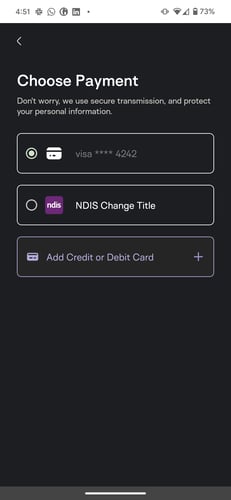
From here on, when booking a provider that falls under an agreed NDIS budget, you will always be able to use your NDIS Budget for booking!
Congratulations on setting up the easiest way to book an NDIS provider! 😍